

How to clear Facebook watch history in 2025: Complete guide

Ever stumbled upon that awkward moment when someone borrows your phone and discovers your Facebook watch history filled with random videos you’d rather keep private? Learning how to clear Facebook watch history has become essential for maintaining your privacy and controlling your digital footprint in 2025. Whether you’re using iPhone, Android, or desktop, this comprehensive guide will walk you through every step to delete your Facebook video history and reset your recommendations.
What is Facebook watch history?
Facebook watch history is a comprehensive log that automatically records every video you view while using the platform. This feature tracks your viewing activity across all Facebook properties, creating a detailed timeline of your video consumption habits that Facebook uses to personalize your experience.
Types of content tracked in watch history
Your Facebook watch history captures various forms of video content:
- Regular videos: Posts from friends, pages, and groups in your feed
- Facebook Watch content: Shows and videos from the dedicated Watch tab
- Live streams: Real-time broadcasts you’ve viewed
- Reels: Short-form vertical videos (though with separate settings)
- Video ads: Sponsored content you’ve watched or interacted with
- Suggested videos: Content recommended based on your interests
How Facebook uses your watch history
Facebook leverages this viewing data in multiple ways:
- Content recommendations: Suggests similar videos based on past viewing
- Feed algorithm: Prioritizes video content from similar creators
- Ad targeting: Shows relevant advertisements based on video interests
- Analytics: Provides insights to content creators about audience engagement
- Cross-platform syncing: Maintains history across devices linked to your account
Understanding what Facebook watch history encompasses helps you make informed decisions about managing your digital privacy and controlling the content you see on the platform.
Why you should clear Facebook watch history regularly
Your Facebook watch history serves as a detailed record of every video, reel, and livestream you’ve viewed on the platform. This information doesn’t just sit idle – it actively shapes your experience and can compromise your privacy in several ways.
1. Privacy protection and security
Facebook stores extensive data about your viewing habits, creating a profile of your interests that anyone with access to your device can view. Clearing your watch history prevents others from discovering your viewing preferences and protects sensitive information about your interests and habits.
2. Algorithm reset and better recommendations
When you accidentally click on irrelevant videos, Facebook’s algorithm can flood your feed with similar content for weeks. By clearing your video watch history, you effectively reset the recommendation system, allowing you to start fresh with content that truly interests you.
3. Digital footprint management
In today’s privacy-conscious world, managing the data companies store about you has become crucial. Regular clearing of your Facebook watch history helps maintain a cleaner digital footprint and limits the information available about your online behavior.
4. Data minimization
In 2025’s privacy-conscious environment, limiting the data companies store about you is increasingly important.
How to delete Facebook watch history on mobile (iPhone and Android)
The process to delete Facebook watch history on mobile devices is straightforward and works similarly on both iOS and Android platforms. Follow these detailed steps to clear your video history.
Step-by-step guide to clear Facebook watch history
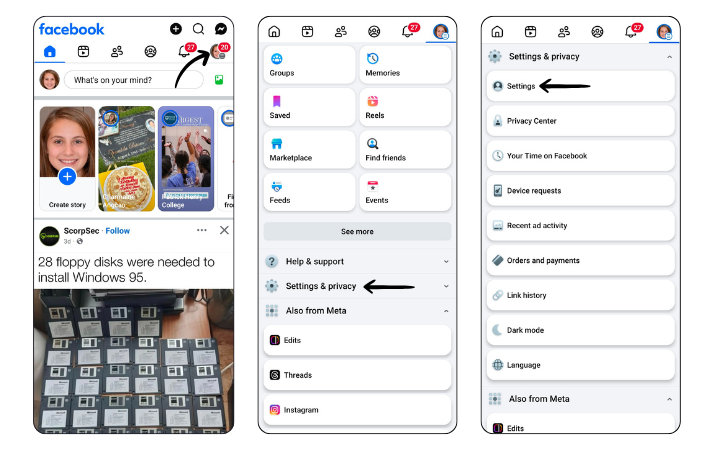
Steps 1-3:
- Open the Facebook app and ensure you’re logged into your account. Tap the menu icon (three horizontal lines) – located in the bottom-right corner on iPhone or top-right on Android.
- Navigate to Settings & Privacy by scrolling down in the menu.
- Select Settings from the dropdown options
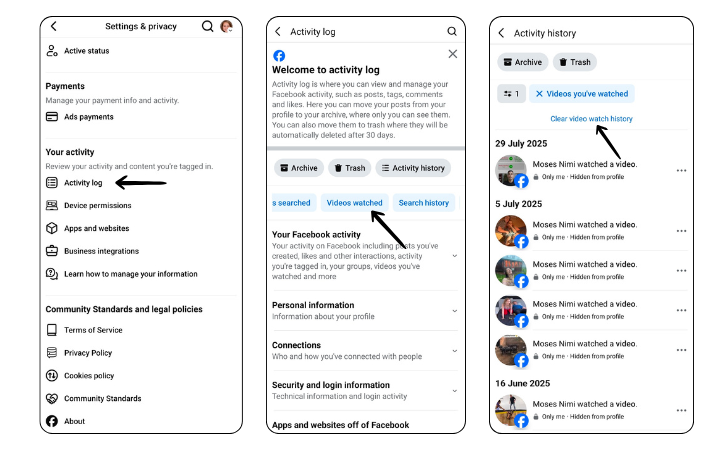
Steps 4-6:
- Find Activity Log under the “Your activity” or “Your Facebook Information” section
- Choose “Logged Actions and Other Activity” to filter your activities
- Select “Videos you’ve watched” from the list of activity types
Steps 7-8:
- Tap “Clear video watch history” at the top of the screen
- Confirm your action by tapping “Clear” when prompted
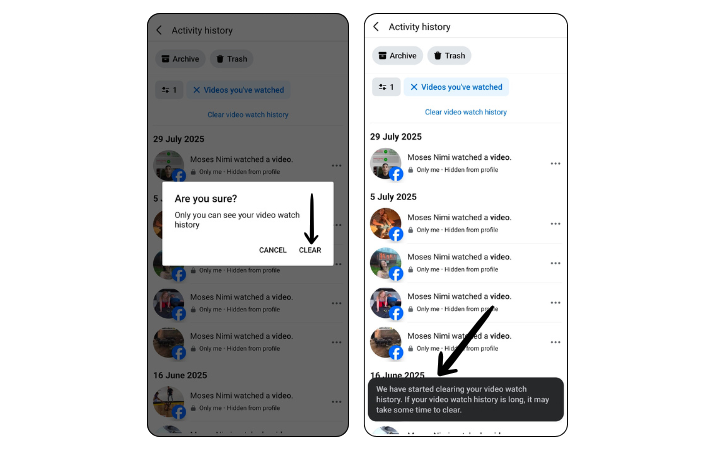
Done! Facebook has started clearing your video watch history. If your video watch history is long, then it may take some time to be clear.
How to clear Facebook watch history on desktop
Desktop users can also easily manage their Facebook watch history through the web interface. The process offers similar functionality with a slightly different navigation path.
Complete desktop clearing process
- Visit Facebook.com and log into your account
- Click your profile picture in the top-right corner
- Select “Settings & privacy” from the dropdown menu
- Click “Activity log” from the expanded options
- Find “Videos you’ve watched” in the left sidebar or under filters
- Click “Clear video watch history” button
- Confirm the action to delete all watch history
Managing watch history by date
The desktop version offers additional filtering options:
- Click the “Date” option in the left sidebar
- Select a specific year and month
- Review and delete videos from that time period
- Use this method for selective clearing based on timeframes
Troubleshooting common issues
Sometimes users encounter problems when trying to clear their Facebook watch history. Here are solutions to common issues.
Watch history won’t clear
If your videos won’t delete:
- Force close and restart the Facebook app
- Clear your browser cache (desktop users)
- Update to the latest app version
- Try using a different device or browser
- Wait 24 hours as Facebook processes the request
Videos reappearing after deletion
When deleted videos return:
- Log out and log back into Facebook
- Check if you’re viewing cached data
- Ensure you’re clearing the correct type of content
- Verify you’ve confirmed the deletion properly
- Contact Facebook support if issues persist
Alternative privacy management options
Beyond clearing your watch history, Facebook offers additional tools for managing your viewing privacy.
Limiting future tracking
Take proactive steps to minimize tracking:
- Adjust autoplay settings for videos
- Use Facebook’s privacy checkup tool
- Limit ad preferences and tracking
- Review app permissions regularly
- Consider using Facebook through a privacy-focused browser
For more comprehensive privacy protection, consider reviewing Facebook’s official privacy guide to understand all available options.
Understanding Facebook video history features
Facebook’s video tracking system is more complex than many users realize. Understanding these features helps you better manage your privacy and viewing experience.
What Facebook tracks in your watch history
Your Facebook video history includes several types of content:
- Regular videos posted by pages, groups, and friends
- Facebook Watch exclusive content
- Live videos you’ve viewed
- Video ads you’ve watched
- Reels (though these have separate privacy settings)
How watch history affects your experience
The videos you watch directly influence:
- Content recommendations in your news feed
- Suggested videos in Facebook Watch
- Targeted advertising based on interests
- Friend suggestions based on mutual viewing habits
- Page recommendations related to watched content
Privacy considerations when clearing watch history
While clearing your Facebook watch history offers privacy benefits, it’s important to understand what this action does and doesn’t affect.
What happens when you clear watch history
When you delete your Facebook video history:
- All viewing records are permanently removed
- Recommendation algorithms reset
- Your saved videos remain intact
- Downloaded videos aren’t affected
- Watch party history may be retained separately
Limitations of clearing watch history
Be aware that clearing your watch history:
- Cannot be undone or recovered
- Doesn’t delete videos from Facebook’s servers
- Won’t remove your interactions (likes, comments, shares)
- Doesn’t affect videos others have shared with you
- May not immediately update recommendations
Best practices for managing Facebook watch history
Developing good habits around your Facebook video history helps maintain privacy while enjoying the platform’s content.
How often should you clear watch history
The frequency of clearing depends on your privacy needs:
- Privacy-focused users: Clear monthly or bi-weekly
- Algorithm management: Clear when recommendations become irrelevant
- Casual users: Clear quarterly or as needed
- Shared device users: Clear after each session
Additional privacy tips
Enhance your Facebook privacy beyond just clearing watch history:
- Review and adjust video privacy settings regularly
- Use Facebook’s “Off-Facebook Activity” tool
- Limit data sharing with third-party apps
- Enable two-factor authentication
- Regularly review logged devices
Conclusion
Learning how to clear Facebook watch history is an essential skill for anyone concerned about their digital privacy in 2025. Whether you’re using mobile or desktop, the process is straightforward and offers immediate benefits for both privacy protection and content recommendation quality. By regularly clearing your Facebook video history and following the best practices outlined in this guide, you can maintain better control over your online presence while still enjoying the platform’s video content. Remember, managing your watch history is just one part of a comprehensive approach to online privacy – combine it with other privacy settings for maximum protection.
FAQs
How do you clear watch history?
To delete your Facebook Watch History, go to “Settings & Privacy” > “Your Facebook Information” > “Activity Log,” then tap “Videos You’ve Watched” and select “Clear Video Watch History.” Confirm to delete.
Does clearing watch history delete my saved videos?
No, clearing your watch history doesn’t affect saved videos. Your saved videos remain intact and accessible through your saved items section.
Can other people see my Facebook watch history?
No, Facebook doesn’t show your specific watch history to other users. Content creators can only see total view counts, not individual viewers.
Will clearing watch history stop video recommendations?
Clearing your watch history resets the recommendation algorithm, but Facebook will start building new recommendations based on your future viewing activity.
Can I recover my Facebook watch history after deleting it?
No, once you clear your Facebook watch history, it cannot be recovered. Facebook doesn’t provide any restoration options, so make sure you’re certain before deleting.